

Agency
Agencies running calling for multiple clients.
5 seats included. Unlimited client sub-accounts and no per-client fee. 48-hour white-glove migration. White-label portal, client reporting and margin billing are in early access.
$550/ month
DialBrio · Power dialer for sales teams and agencies
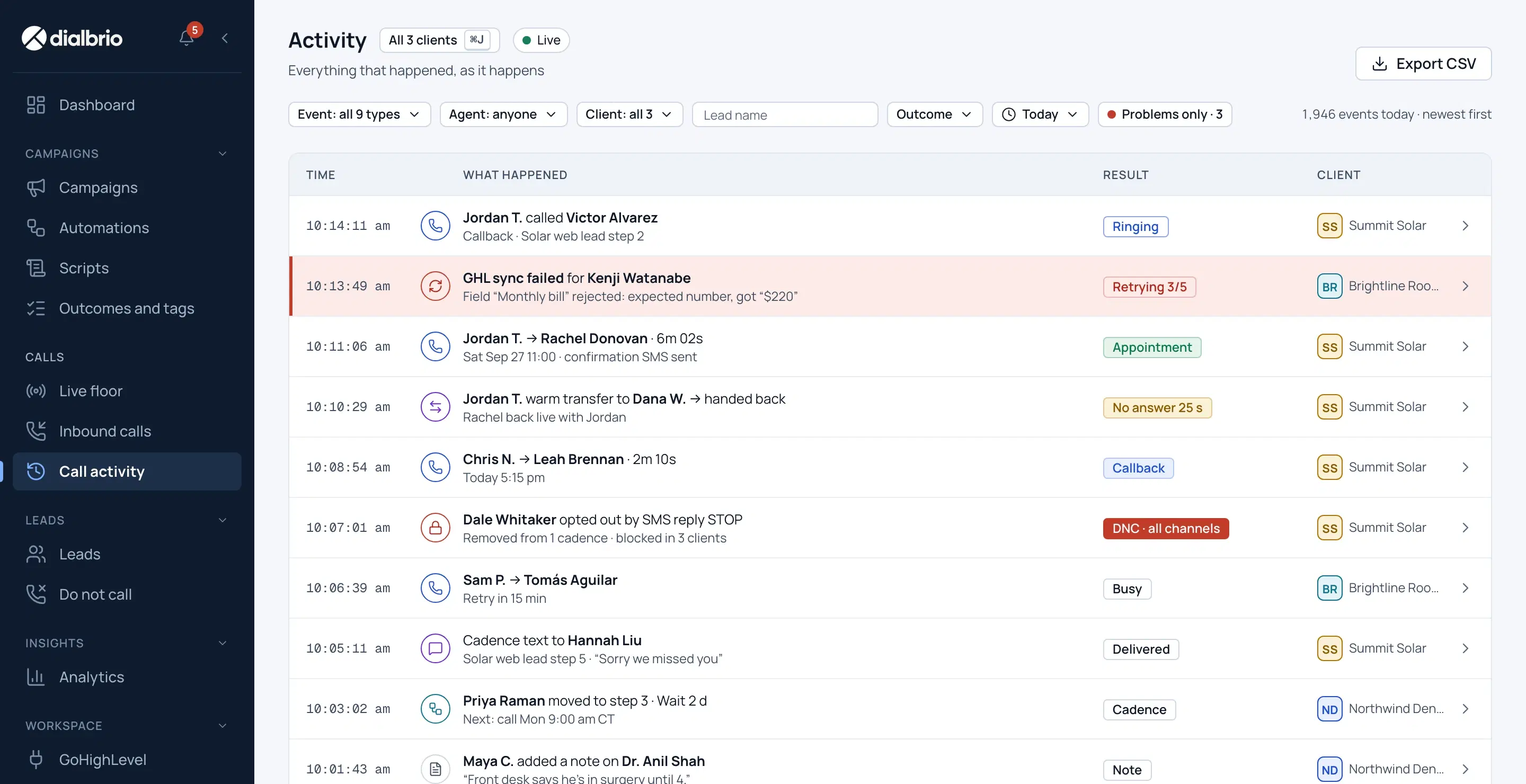
Every client’s leads in one campaign, so reps dial straight through. Each outcome updates the stage and tags in GoHighLevel.
14-day free trial · 500 free minutes · no credit card
Ringing now
Up next
Rachel Donovan
SSSummit Solar· +1 303 555 0101
0:00
Dialing
Dialing four lines. You only hear a person.
Watching a live session
Lead
Synced to GoHighLevel
Sample client names, shown on demo data
You can run perfect ads and still lose the lead in the first hour. These are the three places it usually goes wrong.
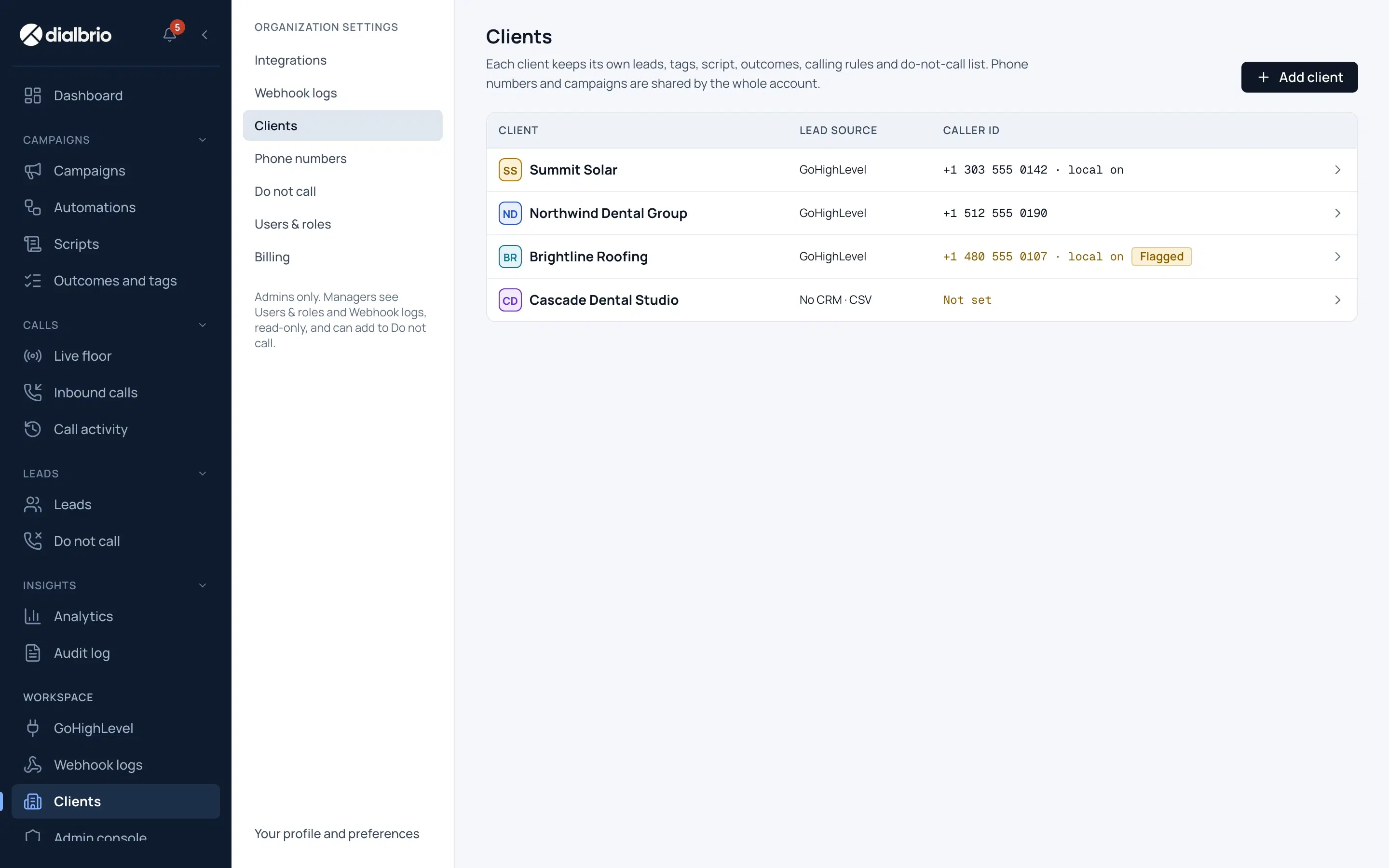
Each client means a few extra clicks: out of one sub-account, into the next, then the script and the caller ID. Those minutes come straight out of your speed to lead.
A lead who fills a form at 2:14 and hears back at 4:40 has often spoken to someone else by then. Speed is decided in the first minutes.
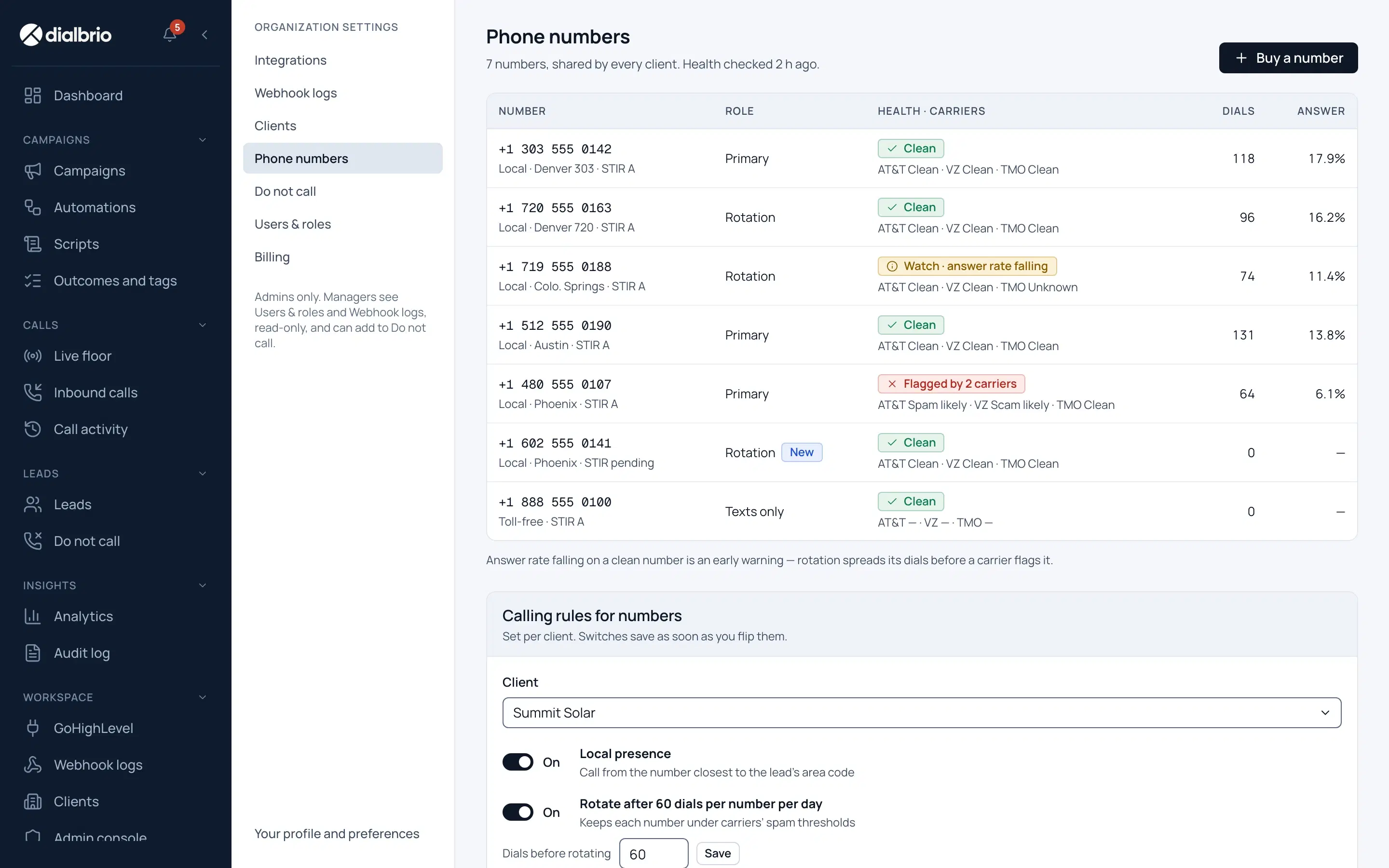
A caller ID marked Spam Likely cuts pickup. Our number analytics watch every caller ID before the dial, so a flagged number reaches you before it reaches your client. Your business name or logo shows on the call wherever carriers and phones support it.
DialBrio puts the lead, the script, the caller ID and the compliance checks in front of the rep before the phone rings, then writes the result back to your CRM.
Leads from every client sit in one campaign, so reps never switch sub-accounts to reach the next lead. Each lead still carries its own client’s script, caller ID and rules, and you keep the margin.
Illustrative client billing · October
| Client | Minutes | Your cost | Billed | Margin |
|---|---|---|---|---|
| SSSummit Solar | 12,400 | $186.00 | $496.00 | $310.00 |
| NDNorthwind Dental | 8,150 | $122.25 | $326.00 | $203.75 |
| BRBrightline Roofing | 3,900 | $58.50 | $156.00 | $97.50 |
| All clients | 24,450 | $366.75 | $978.00 | $611.25 |
How it runs
Follow one lead from the moment a form fills to the booked call.

A form fills in your CRM.
Four lines ring at once, and prospects see your business name or logo where their phone supports it. The rep hears the first person who picks up.
The rep picks the outcome. Rio writes the call summary.
The booking sits on the right GoHighLevel calendar, and the call happens. The Cadence takes care of the rest.
Minute by minute
The lead joins one queue with its script and caller ID.
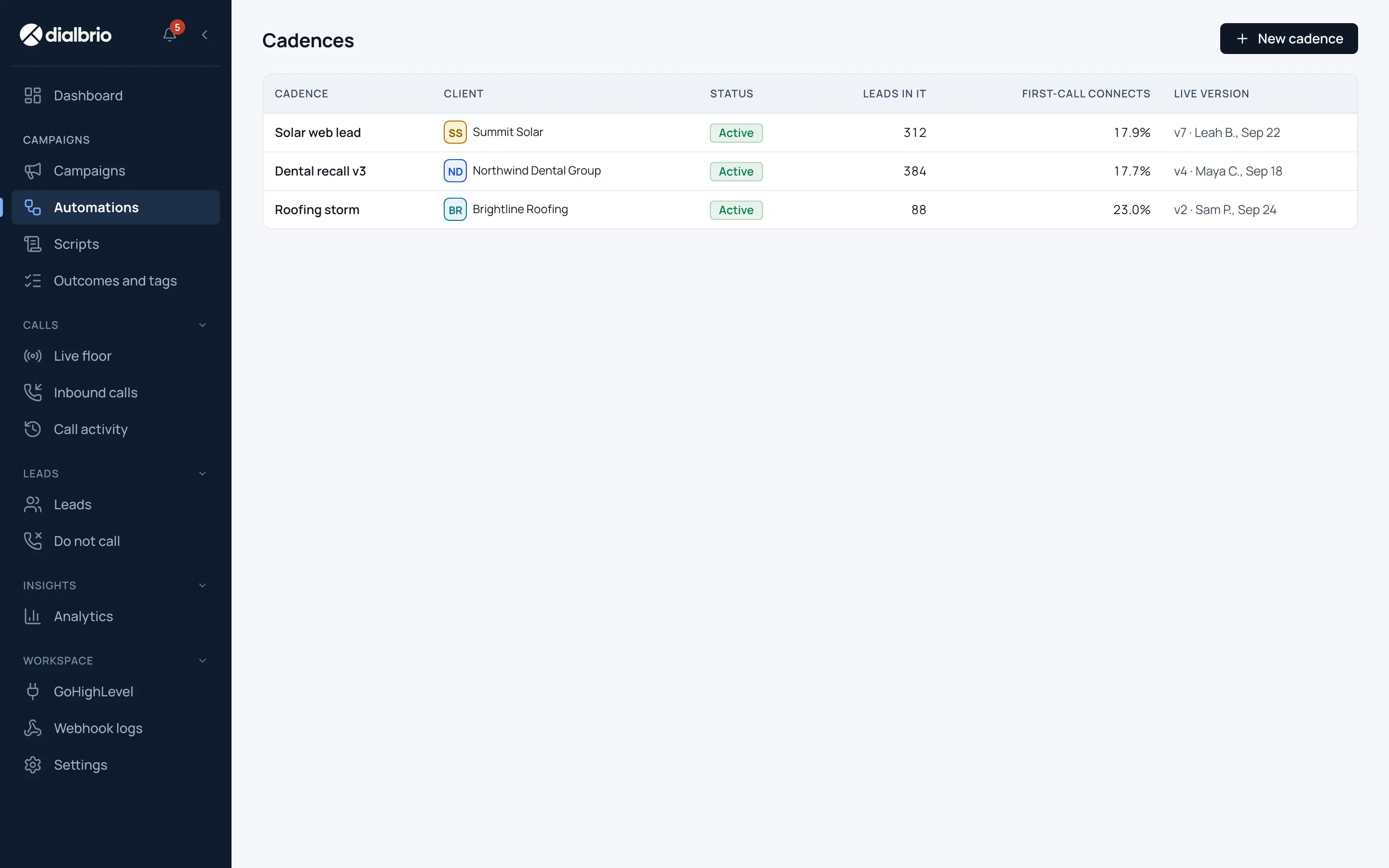
On a voicemail or no answer, the dialer leaves your voicemail and sends your canned messages, all set in the Cadence. Then the lead moves to its next step.
Notes, outcome and next step sync back to the right contact in your CRM.
Reps get a faster day, managers get a view of the floor, and every lead gets a call.
Each rep dials up to four leads at once and hears only the first person who picks up. Answering machines are detected and skipped.
A form fill in your CRM rings the prospect in under 10 seconds, from a local number they recognize. An agent joins to pitch the moment they pick up.
Web form · new lead
Early access: managers watch every call as it happens, then listen in, whisper to the rep or join the call when it needs them.
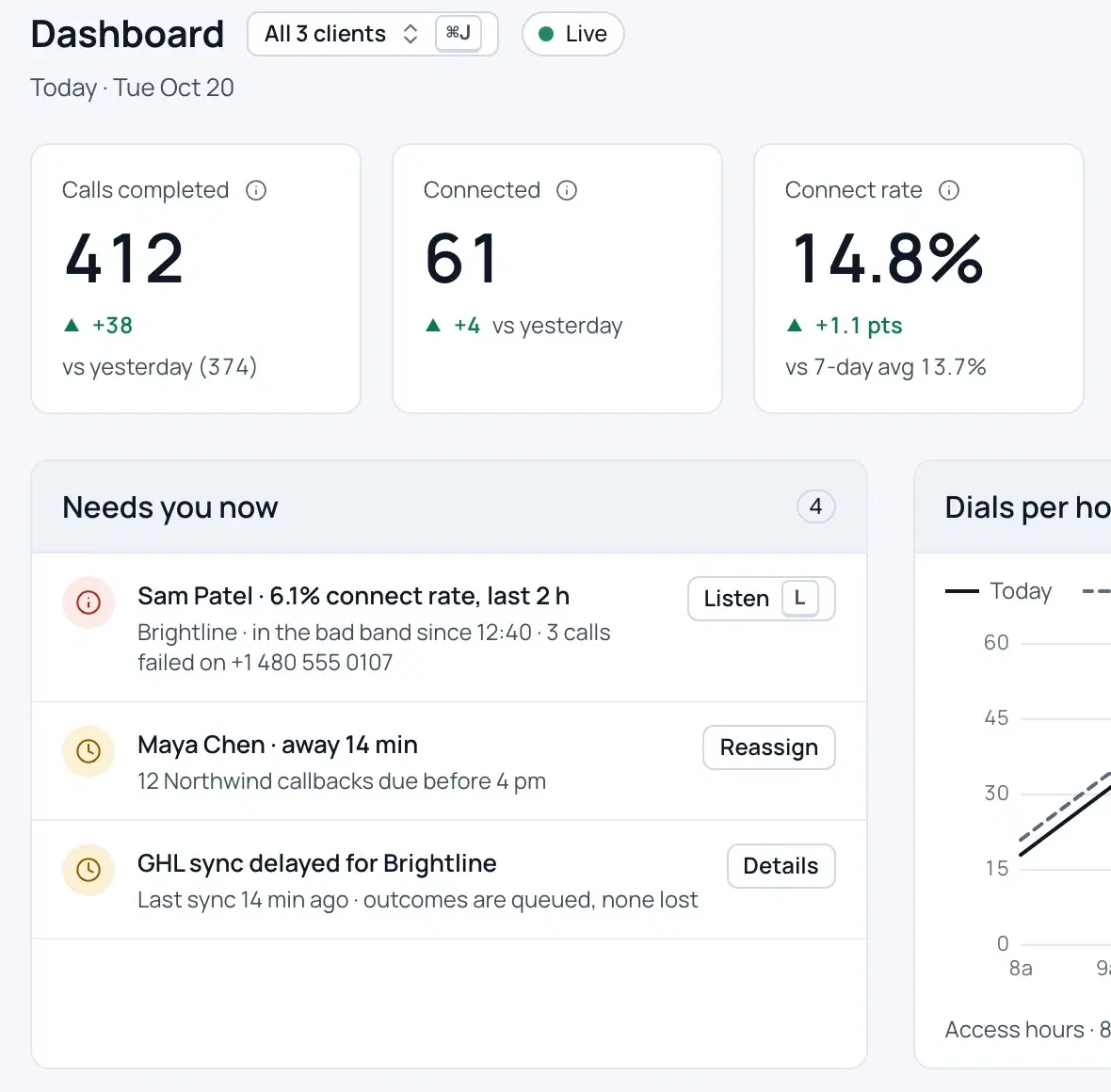
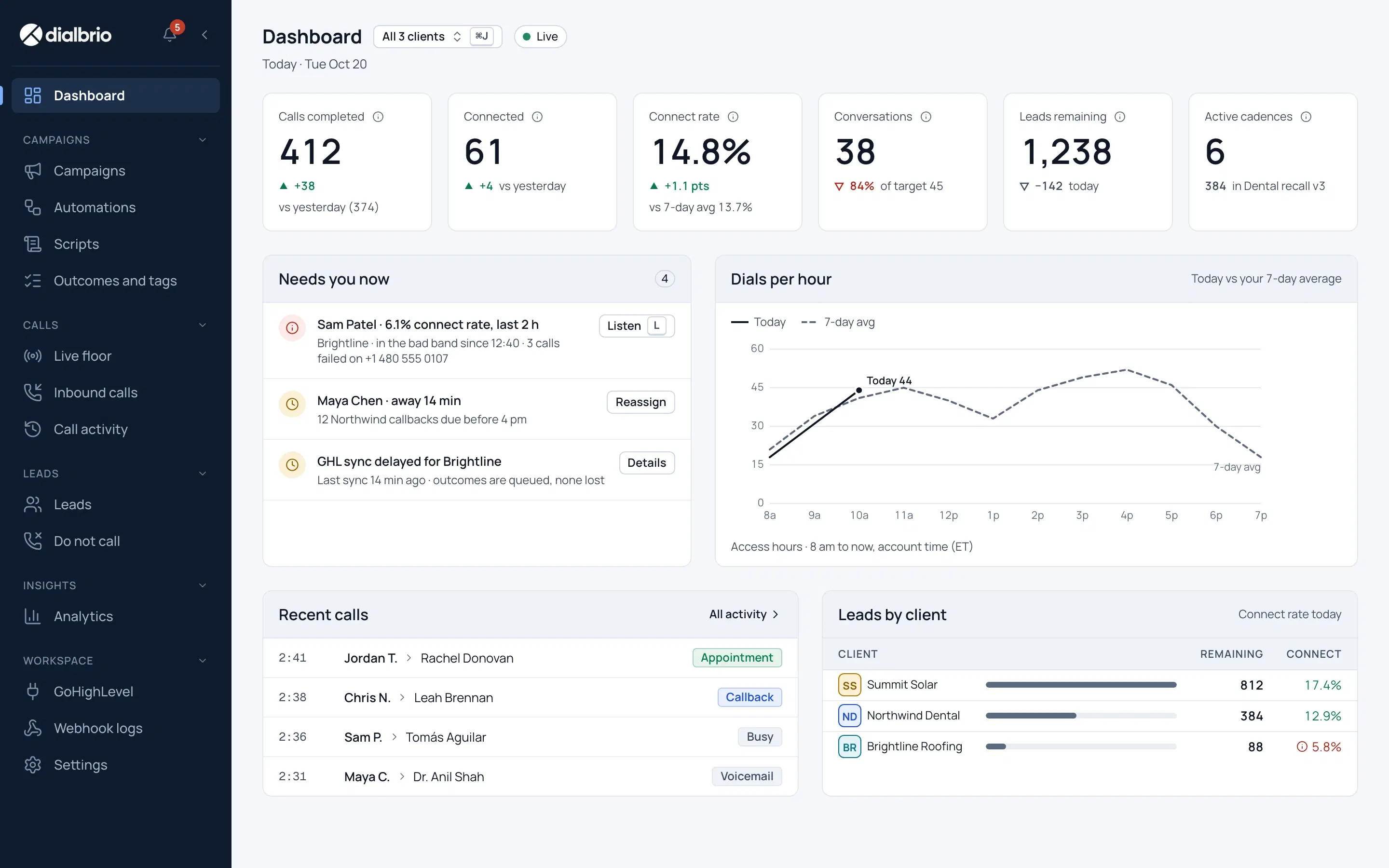
No-answers get your voicemail and canned messages, then roll into the next call or text on their own, so every lead is worked until it books or opts out.
After the call
Every disposition can move the pipeline stage and add or remove tags automatically, so workflows in GoHighLevel start without anyone updating a record by hand.
| Disposition | Pipeline stage | Tags |
|---|---|---|
| Booked | Pipeline stageAppointment booked | TagsAdd booked, remove active-lead |
| Callback | Pipeline stageFollow-up | TagsAdd callback, keep in cadence |
| No answer | Pipeline stageStays where it is | TagsAdd attempt tag, cadence continues |
| Not interested | Pipeline stageClosed lost | TagsAdd not-interested, remove active-lead |
| Wrong number | Pipeline stageNeeds review | TagsAdd bad-number |
An example mapping. You choose the stage and tags for each disposition. This sync runs natively with GoHighLevel; other CRMs receive the same events by webhook.
Every call is recorded and logged to the contact, ready for review.
Searchable text of each call, attached to the contact.
The right information on one screen, a number people answer, and help when an objection comes up.
The rep sees which client they are calling, the script, the current offer and the playbook on one screen, so nobody hunts through tabs or sub-accounts mid-call.
Tells the rep how to handle an objection while the prospect is still talking. The dialer works fully without it.
Numbers are registered and checked for spam flags before dials go out, and your business name or logo shows where carriers and phones support it. No dialer can stop a carrier from labeling a number, so we watch for it.
The call shows a local number that matches the prospect’s area code.
Calls, texts and waits run in order and stop the moment a lead books or opts out.
The rep picks a disposition and the pipeline stage and tags update on their own, so there is no admin after the call.
Setup
No setup fee. A one-hour setup call gets most of it done, and your business profile fills itself in from GoHighLevel.
Install the app in your agency account and authorize it. No API keys to paste.
On the call we map your sub-accounts, build the first campaign, and set which pipeline stage and tags each disposition changes.
Pick a timeframe, then select the tags from each sub-account you want in DialBrio. Everything syncs over in minutes, and new leads with those tags keep flowing in.
We pull the business details from each GoHighLevel account, so you review and submit instead of retyping. Carriers approve profiles on their own schedule, and that is the one step we cannot speed up.
Once a number is registered, reps open the campaign and dial. Everything before that point is already working.
DialBrio does not replace your CRM. It stays the system of record, and the dialer reads from it and writes back to it.
Install the app in your agency account, deploy it to sub-accounts and queue by tag. Outcomes land on the right contact.
See the GoHighLevel setupHubSpot and Salesforce sync natively in both directions. Any other CRM pushes leads into a queue and reads calls and outcomes through the REST API.
See every connectionReceive webhooks for call events, so your CRM, your automations or your own app can react as calls happen.
How connections workPick the one that sounds like your team.
Four lines, a clean queue and a script on screen.
Start on the dialer pageOne queue across every client, with per-client scripts and caller IDs.
DialBrio for agenciesConnect through the API and webhooks, with HubSpot and Salesforce built in.
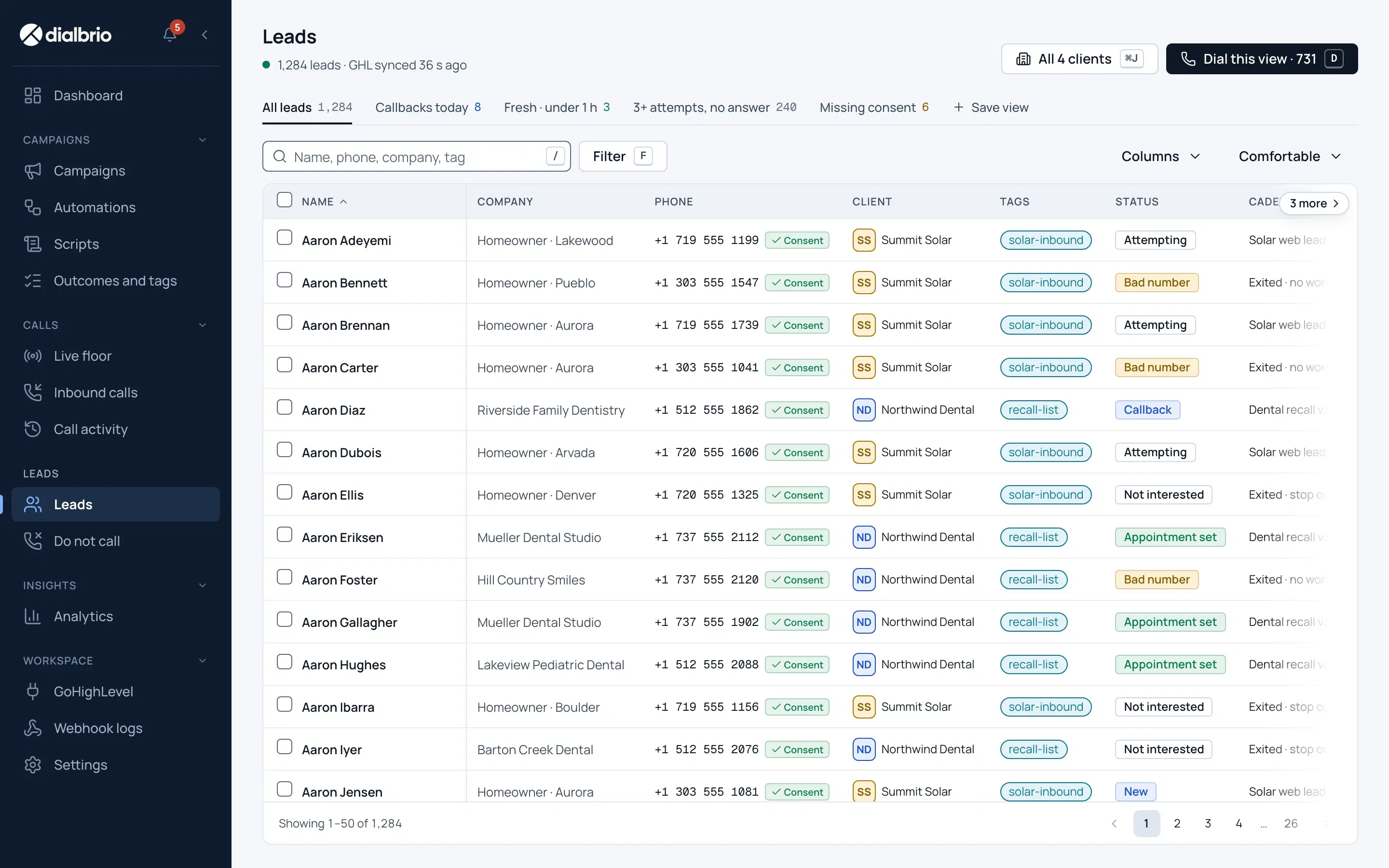
How connections workScreens from DialBrio, shown on demo data.
Every client’s leads in one list, ready to dial in one session.
Ask them before your clients are on it. These are our answers.
| Question | DialBrio |
|---|---|
| Can reps work every queue from one screen? | Yes. Each lead carries its own script and caller ID, so reps never switch tools or accounts. |
| How fast does a new lead get called? | Under 10 seconds from form fill to the prospect’s phone ringing, from a local number they recognize. |
| What is checked before each dial? | DNC lists, the consent record and the lead’s local calling hours. A blocked call shows the rep why. |
| Does it need Zapier to reach my CRM? | No. GoHighLevel, HubSpot and Salesforce connect natively, and other CRMs connect through the API and webhooks. |
| What does it cost at your size? | It is published. 10 clients, 6 reps and 40,000 minutes comes to about $1,229 a month. |
We compare ourselves against the dialers agencies use, with sources and dates, and we say where they are better.
The system enforces calling rules before the phone rings, so they never depend on a training doc.
Every number is checked against DNC lists and its consent record before it dials.
State calling hours are enforced in the lead’s own time zone.
A STOP reply or a DNC outcome blocks the number across every client.
Every change is logged. Admins, managers and agents see only what they should.
14-day free trial · 500 free minutes · no credit card · all plans
Agencies running calling for multiple clients.
5 seats included. Unlimited client sub-accounts and no per-client fee. 48-hour white-glove migration. White-label portal, client reporting and margin billing are in early access.
$550/ month
An agency with its first few clients.
3 client sub-accounts and 3 seats. Every feature on every plan: four-line dialing, speed-to-lead auto-dial and GoHighLevel sync.
$350/ month
Starter is $125 a month for one client sub-account and one seat. Yearly billing saves 15%. Enterprise is custom. Compare every plan and see what 10 clients cost.
If it’s not here, bring it to the demo.
DialBrio is a power dialer for sales teams and agencies. Leads land in a call queue, reps dial up to four lines at once with the script on screen, and every outcome is written back to your CRM.
Sales and SDR teams that need fast follow-up, and agencies that call and book appointments for clients. It connects natively to GoHighLevel, HubSpot and Salesforce, and to any other CRM through an open API and webhooks.
Yes. GoHighLevel, HubSpot and Salesforce connect natively. Any other CRM can connect through the REST API and webhooks, and your CRM stays the system of record.
Install the DialBrio app once in your agency account and deploy it to every sub-account or just one. Leads sync as they are created, tags included. You build call queues from tags, and any new lead with a queued tag joins automatically.
Back to that client’s contact in GoHighLevel: outcome, notes and bookings, seconds after the call.
Not for GoHighLevel, HubSpot or Salesforce, which sync natively in both directions. Other CRMs connect through the API and webhooks.
One, or up to four at once. Answering machines are skipped, so the rep only hears a person.
DNC lists, the consent record and state calling hours in the lead’s own time zone. This runs on every plan. If a call is blocked, the rep sees the reason.
For opt-in leads (forms, ads, inbound) you dial on DialBrio numbers, bought inside the app. Purchased or scraped cold lists run on your own Twilio account.
A monthly plan plus metered usage at published rates: 1.5¢ a minute for outbound calls, 1.2¢ per SMS segment, $2 per number per month and $59 per extra seat. A 10-client agency with 6 reps and 40,000 minutes comes to about $1,229 a month.
Yes. The Agency plan is built for resale, so you set your own client prices on minutes and seats and keep the margin. The white-label portal and automated client billing are in early access.
No. Every plan is month to month with no setup fee. The Agency plan includes a 48-hour white-glove migration.
About one hour on a call with us gets most of it done: connecting GoHighLevel, mapping sub-accounts, choosing which leads to import by timeframe and tag, building the first campaign and choosing how dispositions move stages and tags. The business profile is prefilled from GoHighLevel. Carrier approval of the profile is the only wait, and it is outside our control.
We onboard teams in small groups and set up each account on a call. Book a demo and we will find a start date.
Book a 20-minute demo and bring your CRM. We will show you how it connects and what it costs at your size.